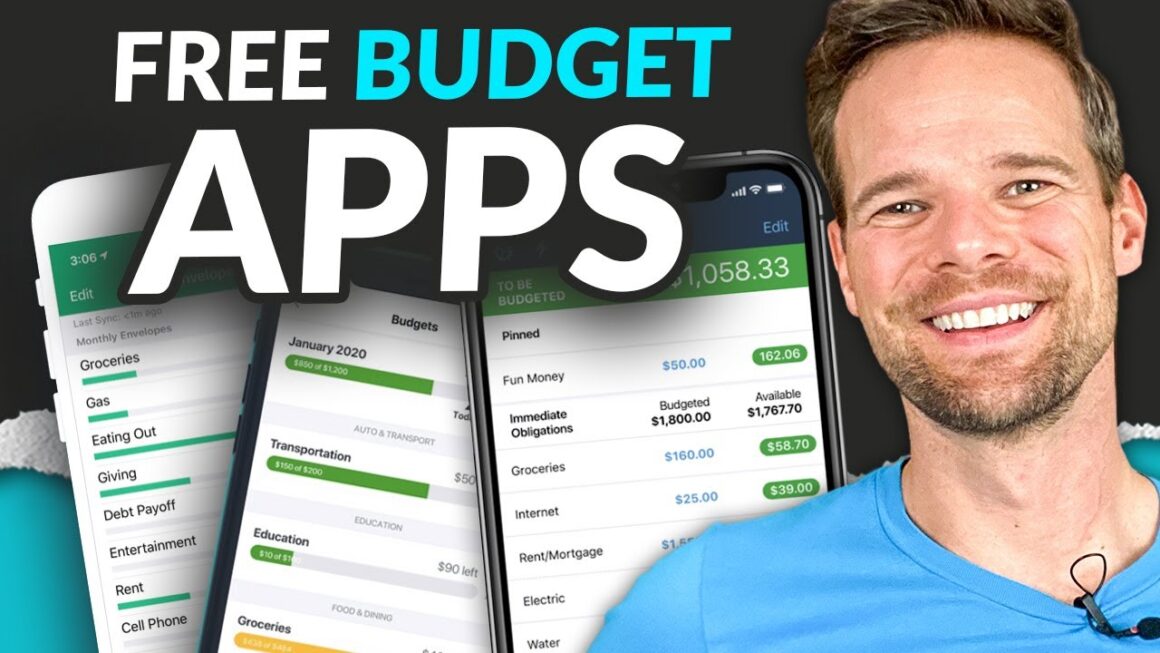

Best Free Budgeting Apps in 2025 (USA & Canada): Honest Picks, Smart Trade-Offs, and Zero-Cost Wins
Why free budgeting apps still matter in 2025
Money feels tight for a lot of households. Budgets break when subscriptions stack up, fees creep in, or life throws a curveball. A good free budgeting app won’t fix everything, but it can:
- show cash flow gaps early
- nudge you toward goals you’ll actually hit
- help you cut waste without adding yet another monthly bill
You’ll see two types of tools below:
- Automated trackers that connect to banks and cards
- Manual, privacy-first trackers for people who don’t want to link accounts
Both can work. The best choice is the one you’ll open weekly.
How this list was curated (so you can trust it)
I focused on free-to-use options available in the United States and/or Canada, verified current features on official sites, and prioritized tools that are:
- widely supported (bank connections or easy manual entry)
- simple to onboard
- transparent about free vs. paid features
Where needed, I’ve included brief cautions so you won’t be surprised later.
Quick definitions you’ll see
- Bank sync: the app pulls transactions automatically from connected accounts.
- Zero-based budgeting: you assign every dollar a job before the month starts.
- Envelope method: you split money into virtual “envelopes” (groceries, rent, etc.) and spend from them.
10 standout free budgeting apps for the U.S. and Canada (plus 3 Canada-only picks)
Below are the apps most people should consider first in 2025. All have a forever-free tier unless noted. Some offer paid upgrades; I call out what’s free vs. premium so you don’t waste time.
1) Empower Personal Dashboard (U.S., limited Canada support)
If you want a powerful overview—budgets, cash flow, investments—and don’t want to pay, Empower Personal Dashboard is a standout. It consolidates accounts, tracks net worth, and lets you create and monitor a monthly budget. Its planning tools skew “investor,” but the day-to-day budget view is clean and motivating. The company confirms its dashboard tools remain free. (Empower)
Best for: People who want budgeting and a big-picture net-worth view.
Watch-outs: Connection coverage can vary for smaller Canadian institutions.
2) Rocket Money (U.S.; Canada coverage varies)
Rocket Money shines if subscription creep is your biggest leak. The free tier lets you track spending, build simple budgets, and spot recurring charges; bill cancellation and some advanced tools require premium. Start with free to spot “ghost” subscriptions, then decide if upgrades are worth it. (rocketmoney.com)
Best for: Canceling forgotten subscriptions and basic budgeting in one place.
Watch-outs: The most powerful features sit behind the paid plan.
3) EveryDollar (U.S. & Canada)
Prefer a straight-ahead, zero-based approach? EveryDollar offers a free version that’s perfect for manual budgeting. You build each month’s plan and log expenses against it. Premium adds bank sync and extras, but many families do great on free. (Ramsey Solutions)
Best for: People who want structure, clarity, and a zero-based method—without syncing.
Watch-outs: Manual entry takes discipline; premium is optional but not required.
4) Goodbudget (U.S. & Canada)
If you love the envelope method, Goodbudget has one of the most generous free tiers: 10 regular envelopes, 10 “annual/goal” envelopes, and two devices—enough for most households. Premium expands limits, but you can absolutely start free. (Google Play)
Best for: Envelope lovers and couples who want to share a plan.
Watch-outs: Free plan keeps only one year of history.
5) Honeydue (U.S. & Canada)
Budgeting with a partner? Honeydue is designed for couples. It’s free, supports account syncing, bill reminders, and in-app chat, and works in both the U.S. and Canada. It’s a solid pick if “transparency without oversharing everything” is your goal. (Honeydue)
Best for: Couples who want to coordinate money without spreadsheets.
Watch-outs: No sophisticated debt-payoff planner; it’s more about visibility.
6) Wallet by BudgetBakers (U.S. & Canada)
Wallet gives you budgets, categorization, and reports. The free tier handles core budgeting and manual entry; automatic bank updates are a premium feature. Try free first to see if manual + reports is enough for you. (Apple)
Best for: Visual learners who like clean charts and flexible budget periods.
Watch-outs: Bank sync and some advanced features require a paid upgrade.
7) Monefy (U.S. & Canada)
Monefy is for people who want speed and privacy. No account linking. You tap twice, the expense is logged, and you’re done. That makes it perfect for students, side-hustlers, and anyone who hates setup. (Google Play)
Best for: Privacy-first users who value quick manual entry.
Watch-outs: No automatic transaction import; you must be consistent.
8) Fudget (U.S. & Canada)
Fudget keeps things ultra-simple: lists of income and expenses, balances that update, and zero bloat. It’s free on mobile and great for “paycheck-to-paycheck” clarity or event-based budgets (wedding, move, vacation). (fudget.com)
Best for: Minimalists who want frictionless lists, not finance dashboards.
Watch-outs: No categories or deep reports; that’s the point.
9) Spendee (U.S. & Canada)
Spendee’s free plan works well if you’re testing budgeting for the first time and don’t mind manual logging. You get clean visuals and simple budgets. You can upgrade later if you decide you need bank sync. (Apple)
Best for: Visual organizers who are just getting started.
Watch-outs: Free plan limits; advanced automation sits behind paid tiers.
10) NerdWallet app (U.S.; content also serves Canada on web)
The NerdWallet app is free and bundles budgeting basics with credit score insights and calculators. It’s a useful “coach” if you want nudges and context rather than strict envelopes. (Canadian users can access similar free tools via the website, even if app availability varies.) (Google Play)
Best for: People who want a “personal finance hub” with budgeting + credit tools.
Watch-outs: It’s more tracker/coach than hardcore envelope budgeting.
Canada-only standouts you should know
RBC NOMI Budgets (Canada; RBC clients)
If you bank with RBC, NOMI Budgets auto-categorizes spending and suggests budgets inside the RBC Mobile app—no extra cost. It’s an easy win if you’re already an RBC customer. (RBC Royal Bank)
- Why it’s great: Personalized, automatic budgets inside your daily banking
- Heads-up: Only inside RBC Mobile; not a standalone app
TD MySpend (Canada; TD clients)
TD MySpend gives TD customers cash-flow views, spending alerts, and basic goal tracking—free companion to the main TD app. It’s ideal if you want instant spending awareness. (TD Canada Trust)
- Why it’s great: Real-time alerts and straightforward categories
- Heads-up: Only for TD customers
KOHO (Canada)
KOHO isn’t “just” a budgeting app—it’s a prepaid Mastercard with a free plan that layers in budgeting tools, insights, and automations (roundups, goals). If you like combining spending + budgeting in one app, it’s compelling. (koho.ca, help.koho.ca)
- Why it’s great: All-in-one spending, saving, and budgeting
- Heads-up: Some perks live in paid plans; start on free
Fast comparison: which free app fits your style?
| App | Price (free tier) | Bank Sync on Free? | Best For | Where | Signature Strength | Watch-Outs |
|---|---|---|---|---|---|---|
| Empower Personal Dashboard | Free tools | Yes | Budget + net worth + investments | U.S. (limited CA) | Holistic view, great planning | Investor-leaning UI (Empower) |
| Rocket Money | Free core; paid add-ons | Yes | Killing subscription creep + basic budgets | U.S. (varies CA) | Subscription detection | Best features require premium (rocketmoney.com) |
| EveryDollar | Free manual | No (premium adds) | Zero-based budgeting | U.S./CA | Simple, focused | You log transactions yourself (Ramsey Solutions) |
| Goodbudget | Free envelopes | No (premium adds) | Envelope method + couples | U.S./CA | Generous free envelope limits | One-year history on free (Google Play) |
| Honeydue | Free | Yes | Couples sharing and chatting | U.S./CA | In-app chat + shared visibility | Fewer advanced payoff tools (Honeydue) |
| Wallet (BudgetBakers) | Free basics | No (premium adds) | Visual budgets and reports | U.S./CA | Polished visuals, flexible budgets | Bank sync is paid (Apple) |
| Monefy | Free | No | Privacy-first quick logging | U.S./CA | Two-tap entry, zero setup | No automation (Google Play) |
| Fudget | Free | No | Ultra-simple paycheck planning | U.S./CA | Lightning-fast lists | No categories/reports (fudget.com) |
| Spendee | Free basics | No (premium adds) | Visual starters | U.S./CA | Clean charts, simple budgets | Limits on the free plan (Apple) |
| RBC NOMI Budgets | Included w/ RBC | N/A (inside bank) | RBC clients | Canada | Auto budgets from your data | RBC-only (RBC Royal Bank) |
| TD MySpend | Included w/ TD | N/A (inside bank) | TD clients | Canada | Real-time alerts | TD-only (TD Canada Trust) |
| KOHO | Free plan | Yes | All-in-one spend + budget | Canada | Roundups, goals, cash back | Some perks are paid (koho.ca, help.koho.ca) |
Two trusted, free budgeting resources (save these)
- Canada’s Budget Planner is a government tool that builds a personalized plan with helpful tips and charts. It’s free and bilingual. Try it if you’re starting from zero or resetting a broken budget. (Link: [Financial Consumer Agency of Canada’s Budget Planner].)
- In the U.S., the CFPB publishes plain-English, printable tools and worksheets you can mix with any app. Great for family money talks or teaching teens. (Link: [CFPB’s “Your Money, Your Goals”].)
Those are the only two outbound links in this guide, by design—credible, ad-free, and useful for both countries.
Financial Consumer Agency of Canada’s Budget Planner • CFPB’s “Your Money, Your Goals”
Picking your app: five quick decision rules
Rule 1 — If you won’t log it, it won’t work.
Choose bank-sync if manual entry exhausts you. Go manual if you care most about privacy and control.
Rule 2 — Start free, add paid only if a feature saves cash or time.
Examples: automatic subscription cancellation, advanced forecasting, or multi-device envelopes for a large family.
Rule 3 — Match the method to your brain.
- Structure nerds → EveryDollar (zero-based) or Goodbudget (envelopes).
- Visual learners → Wallet, Spendee, or Empower.
- Couples → Honeydue.
- Minimalists → Fudget or Monefy.
Rule 4 — If you bank with RBC or TD, try the built-in tool first.
Fewer logins, fewer headaches, and it’s already connected to your accounts.
Rule 5 — Hold a 15-minute money check-in weekly.
No app beats a calendar reminder you’ll keep.
What “free” usually includes (and what it doesn’t)
Commonly free:
- Creating budgets and categories
- Manual expense tracking
- Basic cash-flow charts and alerts
- Shared budgeting on a couple devices (Goodbudget free tier)
Often paid:
- Bank syncing and auto-categorization (EveryDollar, Wallet)
- Multi-year history and advanced reports (Goodbudget Plus)
- Subscription cancellation services and bill negotiation (Rocket Money premium)
- Multiple users across many devices
Check the in-app upgrade screen before you commit. Free is all you need to build the habit.
Tiny setup guide (10 minutes, tops)
- Pick one app from the table that matches your style.
- Name your top five categories (rent/mortgage, groceries, transport, debt, fun).
- Add income and fixed bills first; see what’s left.
- Set a simple savings target (even $25/week).
- Turn on alerts for overspending and big charges.
- Schedule a weekly 15-minute review in your calendar.
- Adjust, don’t quit. If groceries are high this month, shift and keep going.
Troubleshooting: when your budget keeps breaking
- Problem: You quit because manual entry is a slog.
Fix: Switch to a bank-sync app like Rocket Money or Empower. (rocketmoney.com, Empower) - Problem: Your partner isn’t onboard.
Fix: Try Honeydue and set a five-minute “money chat” in the app weekly. (Honeydue) - Problem: Cash disappears on subscriptions.
Fix: Use Rocket Money to identify recurring charges, then cancel what you don’t use. (rocketmoney.com) - Problem: You need envelope discipline without paying.
Fix: Start on Goodbudget’s free plan (20 envelopes across regular + annual/goal). (Google Play) - Problem: You want everything inside your bank app.
Fix: If you’re in Canada with RBC or TD, test NOMI Budgets or TD MySpend first. (RBC Royal Bank, TD Canada Trust)
Advanced corner: privacy-first and open-source
If you want local control and open-source ethos, try Actual Budget. It’s free and supports an envelope-style workflow with local-first data. Tech-comfortable users can self-host or run it locally and sync devices. It’s not for everyone, but it’s a rare free and private path for power users. (actualbudget.org)
Mini playbooks for common goals
Paycheck-to-paycheck relief (30 days):
- Choose Fudget or Monefy to log daily spends.
- Cap “fun” to a fixed weekly number.
- Move leftover funds every Friday to a high-yield savings account.
Debt payoff focus:
- Use EveryDollar or Goodbudget to assign every dollar to debts first.
- Track your balance drop weekly to stay motivated.
Couples on the same page:
- Use Honeydue with shared alerts and chat.
- Agree on a “no-question spend” limit per person (e.g., $50).
- Set one shared goal (e.g., Paris, 2026) and automate a weekly transfer.
Students and first jobs:
- Use Monefy for a zero-friction routine.
- Add one new category per month as life gets more complex.
Investors who also budget:
- Use Empower for the one-stop view and monthly budget.
- Set net-worth checkpoints quarterly to stay on track.
Frequently asked questions (fast answers)
Are free budgeting apps safe?
Most reputable apps use bank-level encryption and read-only connections. If that still worries you, choose a manual tool like Monefy or Fudget.
Will a free app be enough long term?
Yes—many people never outgrow free tiers. Upgrade only if a paid feature saves you time or real money.
What if my bank isn’t supported?
Try a bank-integrated option (RBC NOMI, TD MySpend) if you’re in Canada, or switch to a manual workflow that you’ll actually keep.
Which app is best for families?
Goodbudget’s shared envelopes work well. Honeydue is excellent for couples.
I hate budgeting. What’s the absolute easiest path?
Pick one app—any from this list—create five categories, set alerts, and do a 15-minute weekly review. That’s it.
The bottom line
Free budgeting tools are more capable than ever. If you’re in the U.S., start with Empower for a wide view, Rocket Money for subscription clean-up, or EveryDollar/Goodbudget for structured planning. In Canada, don’t skip your bank’s built-in tools (RBC NOMI, TD MySpend) and consider KOHO if you like everything under one roof. Combine any of these with a weekly money check-in and you’ll see progress—without paying a dime.
Citations for key claims
- Empower’s free dashboard tools and budgeting features. (Empower)
- Rocket Money offers a free tier; advanced features are premium. (rocketmoney.com)
- EveryDollar has a free version suitable for manual zero-based budgeting. (Ramsey Solutions)
- Goodbudget free plan limits and device/envelope counts. (Google Play)
- Honeydue is a free couples app with broad institution support. (Honeydue)
- RBC NOMI Budgets lives in RBC Mobile and recommends budgets. (RBC Royal Bank)
- TD MySpend is a free companion app for TD customers. (TD Canada Trust)
- KOHO offers budgeting tools within a free plan. (koho.ca, help.koho.ca)
(Remember: the only two clickable resources inside the article are the Government of Canada Budget Planner and the CFPB toolkit, to keep this simple, credible, and clutter-free.)
Here’s a dedicated FAQ section you can use for your blog post on Best Free Budgeting Apps in 2025:
Frequently Asked Questions (FAQs)
1. Are free budgeting apps really effective compared to paid ones?
Yes. Many free apps offer everything you need to build and maintain a budget. Paid plans usually add automation (like bank syncing) or advanced reports, but the core budgeting features are often free and powerful enough.
2. Which free budgeting app is best for couples in 2025?
Honeydue is the top pick for couples. It allows shared budgets, bill reminders, and even in-app chat. If you want a structured method together, Goodbudget is another solid choice with free shared envelopes.
3. What’s the best free budgeting app in Canada?
If you’re with RBC or TD, try NOMI Budgets or MySpend first—they’re built into your banking app. For a broader solution, KOHO offers a free plan with budgeting tools and prepaid spending.
4. Can I use these apps without linking my bank accounts?
Absolutely. Apps like Monefy, Fudget, and the free version of EveryDollar let you track expenses manually. This is great for people who prioritize privacy or don’t want external connections.
5. Which app helps the most with subscription tracking?
Rocket Money (free version) is excellent for spotting recurring charges and forgotten subscriptions. If you’ve ever wondered “why is my card always low?”—this is the app to try.
6. Do free budgeting apps work offline?
Some do. Monefy and Fudget allow offline entry, then sync later if needed. Others, like Empower or Rocket Money, require internet since they pull live banking data.
7. Are free budgeting apps safe to use?
Yes, major apps use bank-level encryption. Still, if you’re cautious about linking accounts, choose manual-only apps like Monefy or Goodbudget where you control all inputs.
8. What’s the easiest budgeting app for beginners?
If you’re new, Spendee or Wallet are excellent. They have clean visuals, simple categories, and free core features to ease you in.
9. Can budgeting apps really help me save money?
Yes. Even a basic budgeting app gives you spending visibility. Seeing where your money actually goes makes it easier to cut waste and redirect funds toward savings.
10. Do I need more than one budgeting app?
Not really. Stick with one app that fits your style—adding multiple apps can cause confusion. If you want to try a new one, export your data first before switching.

![# 50/30/20 Rule: Does It Still Work in 2025? *Unlocking the budget blueprint that still bites—and where it flops* --- ## Introduction: The Budget Rule with Staying Power Remember the day you sat down with your paycheck, GPS set for financial freedom, and thought: “If only I had a simple rule to follow”? That’s where the 50/30/20 Rule comes in. First popularised by Elizabeth Warren in *All Your Worth*, the rule says: budget **50 %** of your after-tax income to “needs”, **30 %** to “wants”, and **20 %** to “savings & debt”. ([Investopedia][1]) In theory, it’s beautifully simple: a tri-bucket system that gives you structure *and* freedom. But it’s 2025. Costs have soared in many regions of the United States and Canada. Housing, groceries, insurance, and digital-living are no longer stable line items. So: **Is the 50/30/20 rule still realistic?** Does it still *work* for you—whether you’re in Toronto, New York, Vancouver or Miami? This post will walk you through: * What the rule is and why it worked. * What has changed in the financial landscape since its heyday. * Where the rule still holds strong—and where it simply fails. * How to adapt the rule for 2025 with practical tweaks. * A clear comparison table for quick review. * A strong conclusion and **5 FAQs** to clear the smoke. Let’s dive in. --- ## What the 50/30/20 Rule Actually Says Before we judge it, let’s make sure the baseline is clear. | Bucket | Percentage | Description | Examples (US/Canada) | | -------------- | ---------- | ---------------------------------------------------------------------------------------------------------------- | ----------------------------------------------------------- | | Needs | ~50 % | Essential costs: housing, utilities, groceries, transport, insurance, minimum debt payments. ([Investopedia][1]) | Mortgage or rent, groceries, car payment, insurance premium | | Wants | ~30 % | Discretionary spending: dining out, travel, hobbies, upgrades. ([LendEDU][2]) | Netflix subscriptions, weekend trips, new phone case | | Savings & Debt | ~20 % | Savings, investments, extra debt repayments beyond minimums. ([Nasdaq][3]) | Emergency fund, RRSP/401(k), paying down student loan early | **Why it caught on:** * It’s simple. * Easy to explain and remember. * Gives you both structure and freedom (you still have 30% for fun). * Helps protect your future by carving out savings. **Initial appeal in Canada & USA:** * With moderate income and moderate cost-living zones, many found it achievable. * It offered a roadmap without becoming overly restrictive. * It balanced living in the now and preparing for tomorrow. --- ## The 2025 Financial Landscape: What’s Changed? If you flick back to 2006 (when the rule was popularised), you’ll realise the world looks different. Here are key shifts: **1. Housing & Needs Costs Have Skyrocketed** * Cities like Vancouver, Toronto, New York, San Francisco, Los Angeles see rent/mortgage taking >30-40 % (sometimes >50 %) of after-tax income. * Utilities, insurance (health, car) and transportation costs have steadily risen. * Some experts argue the “needs” bucket should now be closer to 60 % in many markets. ([Nasdaq][3]) **2. Income Instability and the Gig Economy** * More people in contract work, side hustles, uncertain income streams. * Variable income makes fixed-percentage budgeting more challenging (you might have lean months). * Budgeting needs to be more flexible than static rule. ([Medium][4]) **3. Wants Have Broadened and Evolved** * Some “wants” are now quasi-“needs”: good internet for remote work, mental-health apps, upskilling platforms. ([Medium][4]) * Consumer behaviour changed: experiences over things, subscription fatigue, digital everything. * Thus, the 30% “wants” bucket may either shrink or take too much depending on your lifestyle. **4. Savings & Debt Burden Are Heavier** * Many are entering adulthood with student debt, auto debt, rental premiums. * Emergency funds have become more important, cushion for job loss or unexpected events. * The 20% savings target may be difficult if debt payments and “needs” are already high. ([LendEDU][2]) **5. Geographic Cost Variation is More Pronounced** * What works in rural America or smaller Canadian cities might fail in major urban centres. * One size doesn’t fit all; the rule’s rigid percentages may need local adaptation. Given all these shifts, it’s not surprising some financial professionals are asking: “Does the 50/30/20 rule still work in 2025?” --- ## Where the 50/30/20 Rule Still Works – And Where It Doesn’t Let’s go through the positives **and** the negatives—so you can decide how it stacks for you. ### ✅ What Works (Positives) * **Great beginner framework**: If you’ve never budgeted before, 50/30/20 is a simple start. Helps you see categories and gives you direction. ([Nasdaq][3]) * **Encourages savings and debt-repayments**: By reserving a savings bucket, it forces future-orientation, not just living for today. * **Fosters discretionary spending room**: The “wants” bucket lets you breathe; you’re not stuck in austerity mode. * **Easy to understand and communicate**: Whether you’re budgeting solo or as a couple, it sets a shared language. ### ❌ What Fails (Negatives) * **Unrealistic in high-cost living areas**: Many residents spend much more than 50% on “needs” already—leaving too little for wants/savings. ([Auswide Bank][5]) * **Rigid percentages may not fit variable incomes**: For freelancers or side-hustlers, monthly income fluctuates—three buckets may need monthly adjustment. * **Oversimplifies complex financial goals**: If you are aggressively saving for retirement, a house down-payment or paying off heavy debt, 20% might be too low. * **Doesn’t account for regional, age or life-stage nuances**: If you’re young, mid-career, retiree or living in rural vs urban — your optimal split might be very different. * **Ignores inflation and rising fixed costs dynamic**: The rule was created in a more stable cost era; it may feel “out-of-date” when grocery prices, rent, insurance all keep rising. In short: The 50/30/20 rule still **can** work—but you must treat it as a guide, not a mandate. You’ll likely need to adapt it to **your** reality. --- ## How to Adapt the 50/30/20 Rule for 2025 – Customisation Guide If you like the tri-bucket logic but find the rigid numbers don’t match your world, here’s how to adapt it. ### Step-by-Step Adaptation 1. **Track your after-tax income** * For USA/Canada: Net take-home pay (after federal/state/provincial tax, retirement contributions, etc.). * If income varies (freelancer/gig): compute a 12-month average or use a “lean month” average. 2. **List your actual ‘needs’ costs** * Housing (rent/mortgage + insurance + utilities) * Transportation (car payments, insurance, fuel/public transit) * Food/groceries * Minimum debt payments + essential insurance/healthcare * For 2025: don’t forget “internet” or “work-from-home tech” if essential * If sum > 50 % of income, you’ll know you need to tweak. 3. **Review your ‘wants’ and define them** * Dining out, subscriptions, travel, hobbies, upgrades, shopping * Distinguish “nice-to-have” vs “must-have for wellbeing” * Decide how you want to trade: Is your 30% realistic? Should you shrink it? 4. **Define your ‘savings & debt’ bucket** * Emergency fund (3-6 months expenses) * Intermediate/long-term savings (RRSP, 401(k), TFSA, etc) * Extra debt repayments (higher interest than minimum) * If you have aggressive goals (buy house, early retirement, etc) you may want >20%. 5. **Adjust your percentages in a flexible way** * Example alternatives: * 60/25/15 if your “needs” are high. ([Auswide Bank][5]) * 40/30/30 if your needs are low and you want higher savings. * Use a tiered model: When income increases, shift extra to savings rather than wants. 6. **Automate and monitor monthly** * Set automatic transfers for savings bucket. * Use budgeting apps (Mint, YNAB, etc) to track wants/leaks. * Revisit every 6-12 months or when your life changes (job change, baby, moving city, etc). ### Example Adapted Splits for North America Here are some *realistic* adapted splits you might consider, depending on your scenario: | Scenario | Needs % | Wants % | Savings & Debt % | Notes | | ------------------------------- | ------- | ------- | ---------------- | ------------------------------------------ | | Urban high-cost city (USA) | 60 | 25 | 15 | When rent/mortgage and essentials dominate | | Mid-income, moderate costs | 50 | 30 | 20 | Classic split suits here | | High savings focus (e.g., FIRE) | 40 | 30 | 30 | Needs low, savings high | | Variable income (freelancer) | 55 | 20 | 25 | Slightly conservative with wants | | Low income / high debt burden | 65 | 10 | 25 | Shrink wants, prioritise savings/debt | ### Tips for USA & Canada Context * In the **USA**: tax withholding, health insurance costs, and retirement savings (401(k), IRA) can impact net income and “savings” bucket. * In **Canada**: consider RRSPs, TFSAs, provincial healthcare, and higher housing costs in some provinces; cost of living in cities like Vancouver/Toronto may push “needs” above 50%. * Use local cost-of-living calculators to check whether your “needs” bucket is realistic for your city/region. * If you carry student debt, high interest rate credit cards or car loans, treat “extra debt payments” as part of your savings bucket — even if it’s technically debt. --- ## The Verdict: Does It Still Work in 2025? Yes — **with caveats**. The 50/30/20 rule remains a **valuable framework**, especially as a starting point or simple benchmark. But **no**, it doesn’t work *out-of-the-box* for everyone in 2025, especially in high cost-living areas or for variable income earners. Here’s a summary of the judgment: * **Works well** if: * You live in a moderate cost-area, or your “needs” are controlled. * Your income is stable and sufficient to cover essentials. * You are comfortable with moderate savings and want a simple plan. * **Needs adjustment** if: * You’re in a high-cost city where “needs” already eat up 60%+. * You earn income irregularly or your financial goals demand higher savings. * You’re in a life stage (e.g., aggressive debt pay-off, early retirement) requiring a different split. In short: Think of 50/30/20 as **the baseline compass**, not the final map. Use it to orient yourself, then customise. --- ## Practical Action Plan: Make It Work for *You* Here’s a step-by-step plan to put into action this week: 1. **Calculate your actual net (after-tax) income** for the last 3 months. 2. **List all your “needs” items** and total them up. 3. **Check what percentage** your “needs” are of that net income. * If >50%, you’ll need to restructure. 4. **List your “wants”** and see if the 30% bucket is realistic (or too high/low). 5. **Define your “savings & debt” goals** for the next year (emergency fund, retirement, house, debt-free). 6. **Select an adapted split** that better fits your situation (use table earlier). 7. **Automate transfers**: set up auto-transfer to savings/investments and auto-payments for debt. 8. **Review monthly**: especially if your income or circumstances change. 9. **Reassess annually**: cost of living, housing market, inflation all change—so should your budget. 10. **Remember flexibility is key**: The goal isn’t perfection. The goal is progress, consistency, and awareness. --- ## Conclusion: A Rule with Age —but Not Inflexibility The 50/30/20 rule has stood the test of time because it offers clarity, balance and simplicity. It still **works** in 2025—but only if you treat it as a **guideline**, not a fixed formula carved in stone. With costs, lifestyles and incomes evolving in North America, you must adjust the percentages, tailor the buckets to your reality, and ensure your budget reflects your goals (whether that’s owning a home, retiring early, or simply living with less financial stress). By doing so, you harness the power of the rule — the structure — while maintaining the flexibility needed for modern life in the USA and Canada. Use it as your launching pad, refine it and let it serve **you**, not the other way around. --- ## FAQs **Q1. Is the 50/30/20 rule based on gross or net income?** It is based on your **after-tax (net)** income—what you actually take home. ([LendEDU][2]) **Q2. What if I’m earning very little and cannot make the 20 % savings target?** That’s quite common. The key is to start with what you *can* save and gradually increase the savings rate as income rises or debt lowers. The framework remains helpful even at 5-10 %. ([LendEDU][2]) **Q3. If housing costs are more than 50 % of my income, should I abandon the rule?** Not necessarily. You should **adjust** the split. For example, increasing “needs” to 60% and reducing “wants” or “savings” temporarily might help you stay balanced. ([Nasdaq][3]) **Q4. Does this budget rule apply if I have irregular income (freelancer/gig worker)?** Yes—but you’ll need to adapt. Use a conservative estimate of monthly income (e.g., average of last 6–12 months). Consider building a larger buffer in “savings” during higher-income months. The fixed-percentage model becomes more flexible. ([Medium][4]) **Q5. Are there better alternatives to 50/30/20 in 2025?** There are several alternatives: * A 60/30/10 split if essentials dominate your budget. ([New York Post][6]) * An 80/20 (“pay yourself first”) model if you dislike tracking. * Zero-based budgeting (every dollar has a job) if you want rigorous control. ([LendEDU][2]) The best model is the one you actually follow. --- **Want a free Excel or Google Sheet template of this adapted budget with formulas?** I can build one tailored to Canada & USA versions if you like. [1]: https://www.investopedia.com/ask/answers/022916/what-502030-budget-rule.asp?utm_source=chatgpt.com "The 50/30/20 Budget Rule Explained With Examples" [2]: https://lendedu.com/blog/50-30-20-rule/?utm_source=chatgpt.com "What Is the 50/30/20 Rule, and Can It Work for You in 2025?" [3]: https://www.nasdaq.com/articles/does-50-30-20-budgeting-rule-still-really-work?utm_source=chatgpt.com "Does the 50/30/20 Budgeting Rule Still Really Work?" [4]: https://medium.com/%40whee.2013/the-50-30-20-rule-reimagined-modern-budgeting-for-the-2025-economy-3c7225363086?utm_source=chatgpt.com "“The 50/30/20 Rule Reimagined: Modern Budgeting for ..." [5]: https://www.auswidebank.com.au/news-blogs/articles/money-rules-that-still-make-sense-in-2025/?utm_source=chatgpt.com "Money rules that still make sense in 2025" [6]: https://nypost.com/2024/03/19/why-60-30-10-budget-is-replacing-50-30-20-method-amid-inflation/?utm_source=chatgpt.com "You're budgeting wrong now - why the 50/30/20 method no longer works and how much you should save instead"](https://finanme.com/wp-content/uploads/2025/11/maxresdefault-2-2-300x300.jpg)